 検索のヒント
検索はキーワードに基づいています。
例:「手順」
自然言語で検索しないでください
例:「新しいプロシージャを作成するにはどうすればよいですか?」
フラクタルノイズマスク
フラクタルノイズマスクは、ユーザーが制御できるマスキングツールで、生成されたノイズを使用して、ペイント中にオブジェクトの表面上の領域をマスクします。
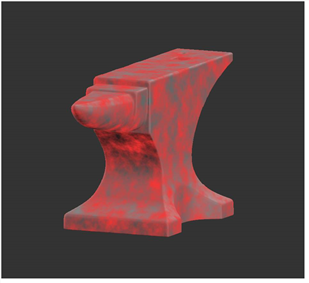
フラクタルノイズマスクを使用して、オブジェクトの表面にペイントが適用される場所をマスクします。
フラクタルノイズマスキングをオンにするには、以下のオプションを設定しますFractal Noise Mask:
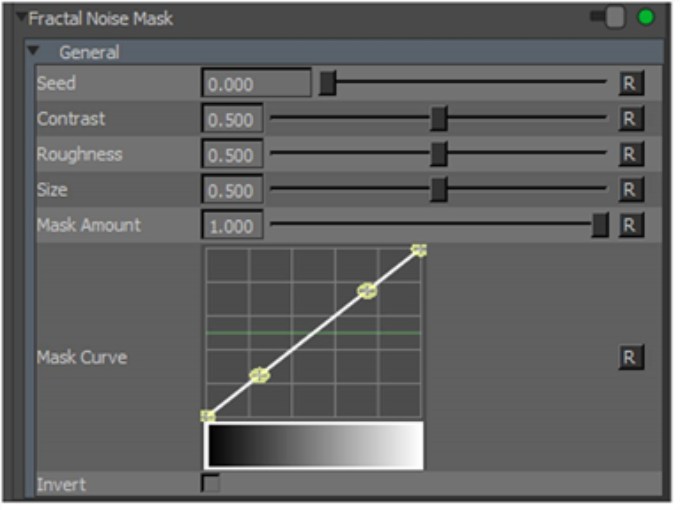
• Seed - changes the pattern of the fractal noise mask by moving the pattern in 3D space.
• Contrast - controls the level of contrast applied to the fractal noise features to derive the mask.
• Roughness - determines the roughness of the fractal noise features.
• Size - Determines the size of the fractal noise features.
• Mask Amount - the amount that the mask affects the paint buffer. 1.0 means that the mask absolutely controls where you can paint; the effects of the mask decrease as the value gets lower.
• Mask Curve -上記のフィールドに基づいて、フラクタルノイズとマスキングの度合いとの関係を制御します。これにより、フラクタルノイズマスクのコントラストとパターンの外観を微調整できます。
• Invert -これを選択すると、マスクデータは黒地に白ではなく、白地に黒になります。
有効にすると、  アイコンがステータスバーに表示されます。
役に立たなかったのでごめんなさい
なぜこれが役に立たなかったのですか? (当てはまるもの全てをご確認ください)
ご意見をいただきありがとうございます。
探しているものが見つからない場合、またはワークフローに関する質問がある場合は、お試しくださいファウンドリサポート。
学習コンテンツを改善する方法についてご意見がございましたら、下のボタンを使用してドキュメントチームにメールでお問い合わせください。
フィードバックをお寄せいただきありがとうございます。