 Search Tips
Search is based on keyword.
Ex: "Procedures"
Do not search with natural language
Ex: "How do I write a new procedure?"
Backface Masks
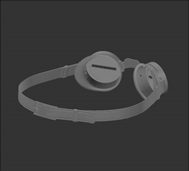
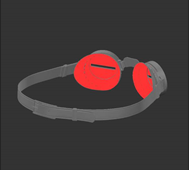
Turning this on simply masks out the backfaces on your model, so you can't paint on them. There are no other configuration options.
|
|
| Backface mask off. | Backface mask on, masking the inside of the lens. |
To turn the depth mask on, next to Backface Mask, click to turn the toggle on.
When enabled, the  icon displays in the status bar.
Sorry you didn't find this helpful
Why wasn't this helpful? (check all that apply)
Thanks for your feedback.
If you can't find what you're looking for or you have a workflow question, please try Foundry Support.
If you have any thoughts on how we can improve our learning content, please email the Documentation team using the button below.
Thanks for taking time to give us feedback.