 Search Tips
Search is based on keyword.
Ex: "Procedures"
Do not search with natural language
Ex: "How do I write a new procedure?"
Fractal Noise Masks
The fractal noise mask is a user-controllable masking tool that uses generated noise to mask areas on the surface of an object while painting.
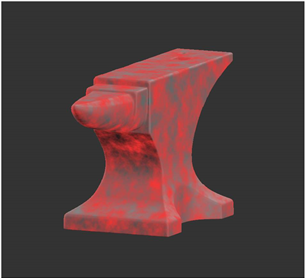
Using fractal noise mask to mask where paint is applied to the surface of the object.
To turn fractal noise masking on, set the options under Fractal Noise Mask:
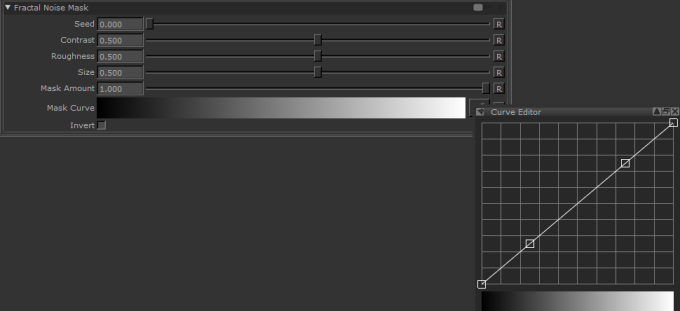
• Seed - changes the pattern of the fractal noise mask by moving the pattern in 3D space.
• Contrast - controls the level of contrast applied to the fractal noise features to derive the mask.
• Roughness - determines the roughness of the fractal noise features.
• Size - Determines the size of the fractal noise features.
• Mask Amount - the amount that the mask affects the paint buffer. 1.0 means that the mask absolutely controls where you can paint; the effects of the mask decrease as the value gets lower.
• Mask Curve - controls how the fractal noise relates to the degree of masking, based on the above fields. This allows you to fine tune the contrast and pattern appearance of the fractal noise mask.
• Invert - if this is selected, the mask data is black on white rather than white on black.
When enabled, the  icon displays in the status bar.
Sorry you didn't find this helpful
Why wasn't this helpful? (check all that apply)
Thanks for your feedback.
If you can't find what you're looking for or you have a workflow question, please try Foundry Support.
If you have any thoughts on how we can improve our learning content, please email the Documentation team using the button below.
Thanks for taking time to give us feedback.