 Search Tips
Search is based on keyword.
Ex: "Procedures"
Do not search with natural language
Ex: "How do I write a new procedure?"
Installation
Warning: If you have any previous versions of the Nuke<>Mari Bridge scripts installed, please remove them first.
To install the Nuke<>Mari Bridge, follow these steps:
On Linux
| 1. | Navigate to the Media/Scripts/Nuke sub-directory of the Mari application directory on your computer. |
| 2. | Copy the contents of this folder to the /home/login name/.nuke directory. |
On Windows
| 1. | Navigate to the Bundle\Media\Scripts\Nuke sub-directory of the Mari application directory on your computer. |
| 2. | Copy the contents of this folder to the \Users\login name\.nuke directory. |
On Mac OS X
| 1. | Navigate to the Media/Scripts/Nuke sub-directory of the Mari application directory on your computer. |
| 2. | Copy the contents of this folder to the /Users/login name/.nuke directory. |
Note: If the .nuke folder already contains a file called menu.py, please open this file and paste the text from the menu.py file (from the sub-directory mentioned in step 1) anywhere into this file.
Tip: These files can be installed anywhere in your NUKE_PATH, however the .nuke folder is convenient for most users. If multiple copies of the scripts are installed in multiple folders in your NUKE_PATH, you may encounter problems. Please ensure that only one copy of each script is present.
Once this has been done, the following items appear in the Nuke UI when launched:
• A Mari menu item:
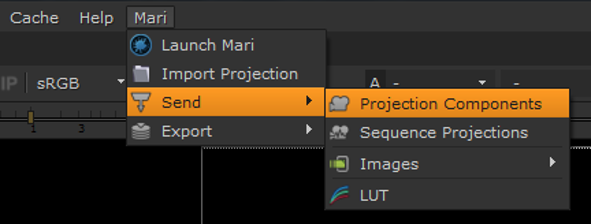
Note: If you intend to launch Mari from Nuke, from the Mari > Launch Mari menu, you can set the environment variable MARI_INSTALL_PATH so that you don’t need to point to the Mari executable every time. For example, MARI_INSTALL_PATH=/usr/local/Mari<version>/mar
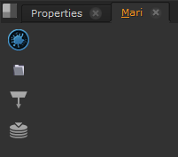
• A Mari tab in the Content menu. You need to create this by right-clicking on the toolbar and selecting Windows > Custom > Mari from the dropdown menu. Once the tab has been created, it appears alongside other tabs in the menu:
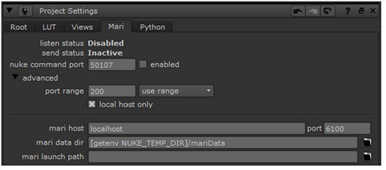
• A Mari tab under Edit > Project Settings:
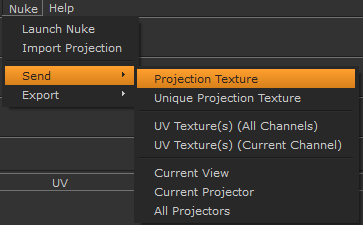
In addition, a Nuke menu item is now available in the Mari UI:
Sorry you didn't find this helpful
Why wasn't this helpful? (check all that apply)
Thanks for your feedback.
If you can't find what you're looking for or you have a workflow question, please try Foundry Support.
If you have any thoughts on how we can improve our learning content, please email the Documentation team using the button below.
Thanks for taking time to give us feedback.