Search Tips
Animated Geometry
Alembic Animated Geometry
When bringing animated geometry into Mari from an Alembic file, Mari displays start frame and end frame controls in the New Project dialog. You can set the range you want to load or import or, if you want to bring in all frames or only a single frame, click on the Single Frame or All Frames buttons. Some .abc files, exported from older version of the Alembic exporter, do not expose their frame range when brought into Mari. In this case, Mari displays the notice "All frames from this archive will be loaded" and loads all frames.
FBX Animated Geometry
FBX stores animation on geometry in a similar manner to Alembic, and supports the concept of animation takes on a skeleton, which allows you to use the same skeleton structure on your mesh to create different animations. Each take is related to the same object, and can have different animation ranges as well. In Mari, this data is presented in the object loader widget in the New Project dialog. You can also select the specific takes you want from the Take dropdown under Mesh Options. However, within Mari, the FBX concept of an animation take is only applicable during geometry load.
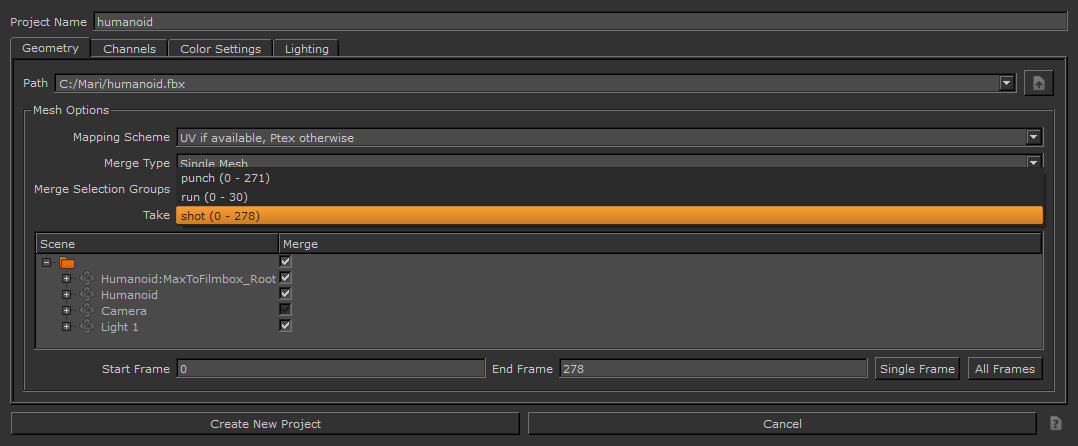
Warning: Once the geometry is imported into Mari, it has the selected animation take bound to it. You won't be able to access any other animation takes or change the animation on the fly within Mari.