Search Tips
Importing New Versions
As with objects, you can add object versions from an .abc or .fbx file to the Objects palette any time after project creation. The object versions must be of the same file type and merge structure; thus, if you already have an object from an .abc file and you loaded it into Mari with merged geometry, the new version should ideally be an .abc file with the same merged geometry. Just the same, if the objects were loaded into Mari with unmerged geometry, the versioned file must also be unmerged.
To add new objects to a project, refer to the steps in Adding and Merging Alembic or FBX Geometry for more information. If you have already added objects to your project and want to load in new versions of them, follow the steps below:
| 1. | Open the Objects palette and right-click on the object for which you want to load a new version. |
The Add Version dialog appears. This looks like a Mari-standard file browser.
| 2. | Select an object from the file browser or type in the file path, then click Ok. |
The Add Version Settings dialog appears.
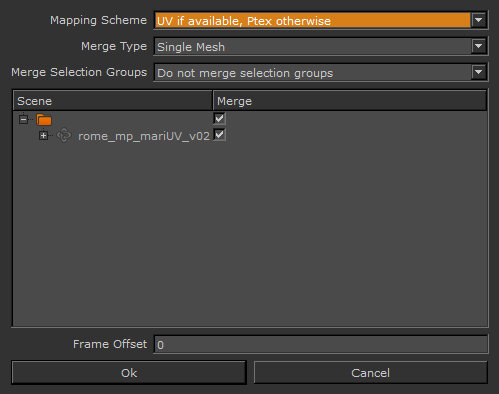
| 3. | Set the Mapping Scheme, Merge Type, and Take options for the new object version. For more information about these controls, refer to the steps in Creating a New Project with Alembic and FBX Files. |
Note: When choosing whether or not to merge geometries, bear in mind that new versions must have the same merge structure as the original object version. For instance, if you already have an object from an .abc file and you loaded it into Mari with merged geometry, the new version must also be an .abc file with the same merged geometry.
| 4. | If the objects are animated, select the start and end frames for a specific selection, or click Single Frame or All Frames. If these options don't appear, you may be given a message that "All frames from this archive will be loaded." |
| 5. | Set a Frame Offset to specify the start position for loading the objects on the Mari timeline. |
| 6. | Click Ok and the new object version is loaded into the Objects palette. |
Note: Mari preserves selection groups between object versions. See Adding and Removing Object Versions.