Curve Rebuild
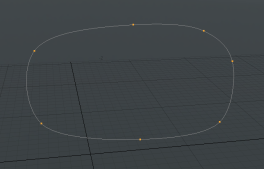
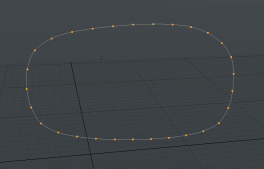
This is a procedural tool that uses a curve to build a new, similar curve but with a different amount of points.
|
|
| Before | After |
The tool has two modes:
• Point Count - Each curve in the input mesh is rebuilt using a set number of points.
• Spacing Distance - Each curve is rebuilt using points at a set distance apart.
Using the Curve Rebuild Tool
The following example stacks a Curve Rebuild tool on top of a mesh containing a curve. You can also add a curve to the tool using the Curve setting in the procedural stack.
| 1. | Draw a curve using the Curve tool, or add a procedural Curve. |
If you have multiple curve meshes and want to target a certain one, select the curve in the Item List or the Mesh Operations List.
| 2. | Click Add Operator in the Mesh Operations List. |
Note: You can also right-click on the mesh in the 3D viewport and select Item Operations > Add Mesh Operation.
| 3. | Double-click Curves > Curve Rebuild to add it to the operations stack and rebuild the curve. |
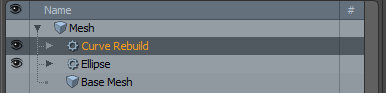
| 4. | Adjust the Mode and Point Count as required. |
Curve Rebuild Properties
|
Curve Rebuild |
|
|
Source Curve |
The mesh containing the curve(s) to rebuild. |
|
Mode |
Sets the point generation method: • Point Count - Generate a set number of points along the curve. • Spacing Distance - Generate points spaced by this amount. |
|
Point Count |
The number of points to use for the curve. |
|
Spacing Distance |
The distance between each point, the appropriate number is generated to match the distance. |
Curve Rebuild Procedural
The Curve Rebuild tool has the following procedural sub-tools:
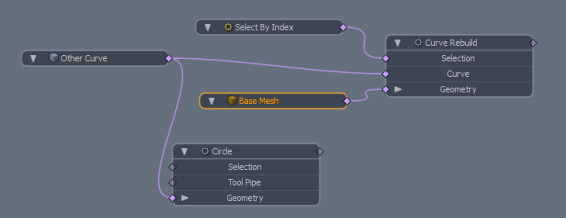
• Selection - Allows you to select one or more curves from the input mesh. The selection can be a single figure, or a range such as 0-4.
• Curve - The input mesh to rebuild. This allows you to rebuild a curve on another mesh layer (or from third-party tools that generate curves) to fill.
• Geometry - This lists any geometry that is affected by the tool. Meshes are connected automatically if they are below the tool in the Mesh Operations list. You can connect additional meshes by clicking (Add Geometry) to open the Preset Browser. From there you can select an existing mesh or add a new, empty mesh.
Curve Rebuild Schematic
The schematic node has the same three inputs as the procedural version. The image below shows an example.