Conditional Modifiers
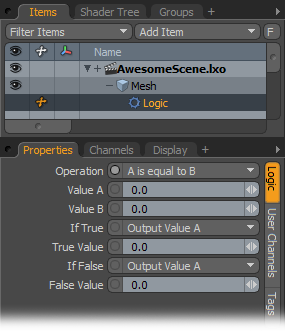
With the Logic modifier, you apply logic to channel operations.
Operation: You can select from the various logic operation options available in this list:
• A is equal to B
• A is greater then B
• A is greater than or equal to B
• A is less than B
• A is less than or equal to B
• A is not equal to B
• And (The result is True if both A and B are not zero.)
• Or (The result is True if A or B are not zero.)
Value A/Value B: These indicate the values of A or B for the operation. Typically you connect the output of another item's channel to these channels for the logic operation.
If True: Specify what Modo outputs when the logic modifier is True:
• Output Value A
• Output Value B
• Output True Value as specified below
True Value: Specify the value to use if you select Output True Value.
If False: Specify what Modo outputs when the logic modifier is False.
• Output Value A
• Output Value B
• Output False Value as specified below
False Value: Specify the value to use if you select Output False Value.

