 Search Tips
Search is based on keyword.
Ex: "Procedures"
Do not search with natural language
Ex: "How do I write a new procedure?"
Color HSV
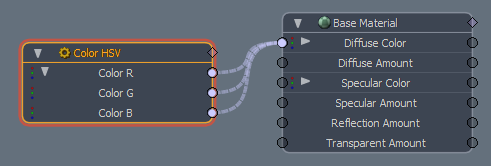
The Channel Color HSV node outputs RGB values based on the intuitive Hue, Saturation and Value color input controls. This allows you to smoothly animate colors by hue, saturation, or value, with correct interpolation, rather than making excessive keyframes for red, green, and blue channels individually.
Usage
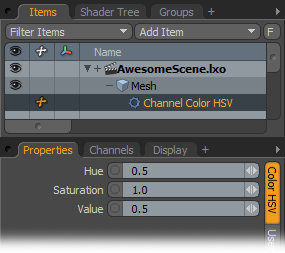
The Color HSV node is added to the Schematic Viewport using the Add function, found in the pop-up menu under Channel Modifiers > Color > Color HSV. Once added, you can select the node and define a color in the Properties panel, based on the intuitive Hue, Saturation and Value color model. Values can either be static or animated. The corresponding color is converted to RGB values internally and output of the three R, G, and B channels of the node.
Note: For information on working with node graphs, see Schematic Viewport.
Channel Color HSV
|
Option |
Description |
|---|---|
|
Hue/Saturation/Value |
These options determine the color value using the HSV color model. Their RGB output values can be linked to a materials RGB value input channels to control the materials colors with the modifier. |
Sorry you didn't find this helpful
Why wasn't this helpful? (check all that apply)
Thanks for your feedback.
If you can't find what you're looking for or you have a workflow question, please try Foundry Support.
If you have any thoughts on how we can improve our learning content, please email the Documentation team using the button below.
Thanks for taking time to give us feedback.