Search Tips
Intro to DMX lighting in Virtual Production
DMX (digital multiplex) is a system that enables you to remotely control multiple light fixtures from one control console. You can switch between different modes and make precise changes to specific LED lighting fixtures.
DMX itself refers to wired connections and electronic signalling. It does not need to be controlled from a computer, but using network cabling to distribute information carries more data, so you can control lots of devices. The sACN protocol is supported by Nuke Stage to control lighting over a network.
DMX lighting refers to the controlling of the physical light fixtures. You can use Nuke Stage to control your lighting fixtures and initiate lighting triggers.
Note: There is no representation of light fixtures inside the 3D scene, and DMX cannot affect the lighting of your 3D assets.
Note: DMX control is currently only outgoing from Nuke Stage, it cannot be used to control properties inside Nuke Stage.
This page covers the concepts of using DMX and sACN to control lighting fixtures. For information on how to set up DMX within Nuke Stage, go to Setting up DMX lighting in Nuke Stage.
Terminology
The following terminology refers to lighting terms within DMX.
• Fixture — refers to a physical lighting fixture.
• Slot — a single byte that can be sent via the network protocol to the lighting fixtures. Only 512 slots can be sent in one universe.
Note: In some light fixture terminology examples, the term channels and slots can be used interchangeably. However, in Nuke Stage, there is a distinction between these terms. A slot is the singular byte in a DMX512, whereas a channel is a single numeric property of a fixture, such as the value of a Dimmer, or the red component of an LED's color. Note that this is different to other programs that use DMX.
• Universe — refers to a set of 512 data slots. If you want to send more than 512 slots’ worth of data to the lighting fixtures, then you will need to send them across multiple universes. This is a property of the DMX protocol. Fixtures will only read the information on their configured universe and slot.
• Channel — a single numeric property of a fixture, such as the value of a Dimmer, or the red component of an LED's color. A channel occupies between 1 and 4 slots. Using multiple slots allows for the channel value to be sent with higher numeric resolution.
• Break — Breaks are arbitrary numbers that are assigned to channels. Channels with matching breaks will be grouped together. Each break of a fixture can be assigned a separate starting address. This allows for mapping channels to discontinuous ranges of DMX addresses, such as different universes.
• Geometry — Geometries are the abstract representation of the physical structure of your fixture. Geometries are organized as hierarchical trees, and each individual geometry in a tree represents a different part of the fixture - e.g. a region of LEDs in a grid fixture, or a single rotation joint in a moveable fixture. Geometries only describe the abstract structure of a fixture; there is no 3D mesh representation of fixtures inside Nuke Stage.
• Mode — A mode describes the set of channels used by a fixture to control it. A fixture can have multiple modes, which often offer different levels of detail to control the fixture, in exchange for using fewer or more DMX slots. The mode used by a fixture is usually configured on the fixture device, and should be matched inside Nuke Stage."
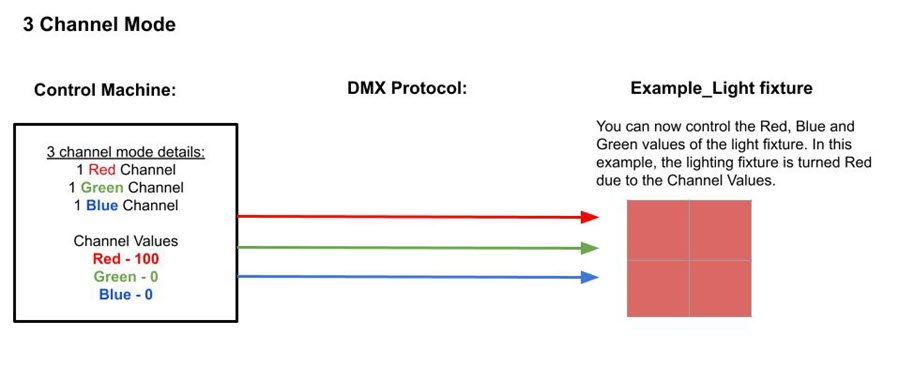
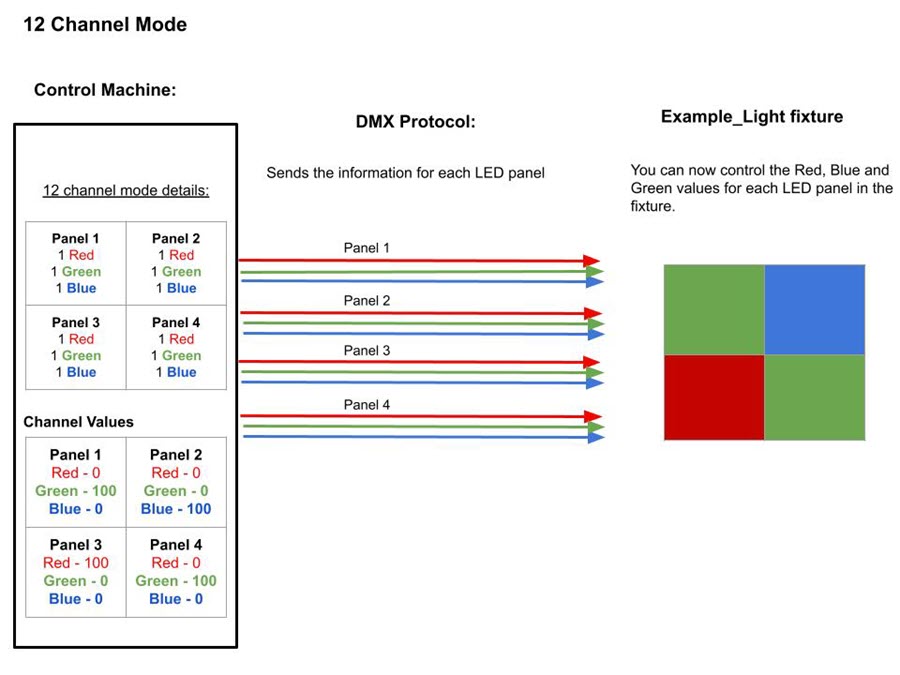
For example, if you had a light fixture made of 4 separate LED regions, how you control this lighting fixture can be configured in different ways.
A 3 Channel mode might only give you the option to control the Red, Green and Blue channels for the whole lighting fixture, so each of the four regions would receive the same information.
The same Fixture profile could then have a 12 channel mode, which, when active, means you can control each of the separate LED regions in the fixture. Because each region is assigned a different set of channels, they can be controlled separately, enabling you to change the values for each region individually.
DMX Architecture
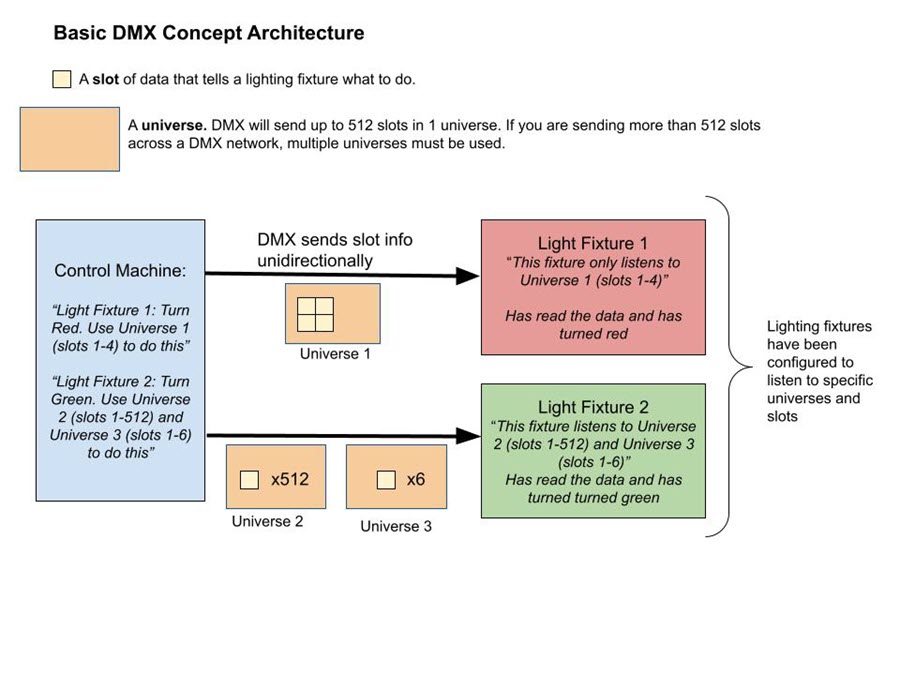
For every physical fixture that you have, it will need to be configured in Nuke Stage, with a specific starting address that defines the Universe number and slot number that the fixture should start reading its data from. To learn more about configuring your lighting fixtures in Nuke Stage, go to Setting up DMX lighting in Nuke Stage.