 Search Tips
Search is based on keyword.
Ex: "Procedures"
Do not search with natural language
Ex: "How do I write a new procedure?"
Adjusting Particle Properties Using Curves
With the ParticleCurve, you can apply a curve to particle properties (such as size or mass) to change them over time.
| 1. | Connect the node to your particle node stream. |
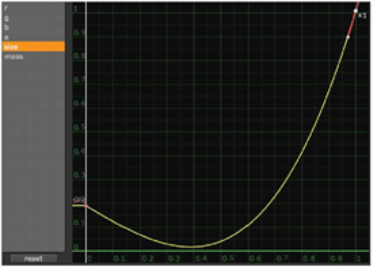
| 2. | Adjust the curves in the ParticleCurve properties panel. The x axis represents the lifetime of the particles. |
• r - adjust the curve for the red channel.
• g - adjust the curve for the green channel.
• b - adjust the curve for the blue channel.
• a - adjust the curve for the alpha channel.
• size - adjust the curve for the size of the particles.
• mass - adjust the curve for the mass of the particles.
|
|
| A size curve modifying the particles to grow in size toward the end of their lifetime. |
Note: If you’re using an image or a 3D object as your ParticleEmitter’s particle input, the ParticleCurve might not alter the colors of the particles as expected.
| 3. | If you want, you can adjust the curve for your particles’ alpha channel so that each particle fades to invisibility toward the end of its lifetime. |
Sorry you didn't find this helpful
Why wasn't this helpful? (check all that apply)
Thanks for taking time to give us feedback.