 Search Tips
Search is based on keyword.
Ex: "Procedures"
Do not search with natural language
Ex: "How do I write a new procedure?"
Using the Eraser Tool
The Eraser tool lets you remove pixels from existing paint strokes.
To Use the Eraser Tool
| 1. | Set opacity, brush type, brush size, and brush hardness in the RotoPaint tool settings at the top of the Viewer. (For information on the available options, see Selecting Existing Strokes/Shapes for Editing.) |
| 2. | Optionally, set the lifetime of the stroke in the RotoPaint tool settings. (For information on the available options, see Selecting Existing Strokes/Shapes for Editing.) |
| 3. | Right-click the Brush tool in the RotoPaint toolbar and select the Eraser tool  . . |
| 4. | Apply strokes as necessary. You can also erase multiple strokes, if you have drawn more than one. |
|
|
|
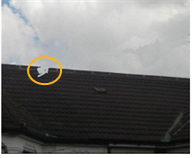
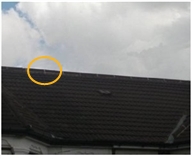
| Unwanted paint strokes. | Using the Eraser tool to remove the unwanted paint strokes. |
Tip: If you’re using a graphics tablet, Nuke automatically switches to Eraser mode when you use the erase end of the pen.
Sorry you didn't find this helpful
Why wasn't this helpful? (check all that apply)
Thanks for taking time to give us feedback.