Search Tips
Versions in Sequences
Swapping versions in sequences allows you to compare results more easily.
Locate the ingested version clip and drag it to the timeline, right-click and select the Version menu:
• Scan For Versions to locate new versions of the clip.
• Version Up or Version Down to increment the version by one.
• Go to the Minimum or Maximum Version.
Tip: You can also use the Alt +Up/Down Arrow keyboard shortcuts to increment versions or Alt+Shift+Up/Down Arrow to go to the maximum or minimum.
Once you’ve scanned for versions, select a shot on the timeline and press V to display all available versions for that item in a convenient window.
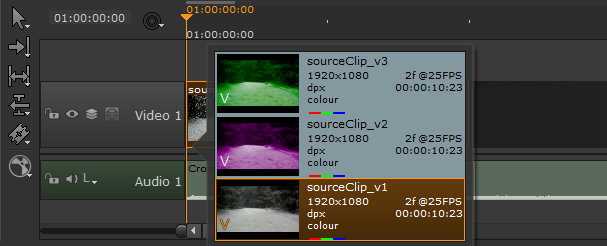
Select the required shot version to set the Active Version.
Note: You can also compare versions with the A/B buffer in the Viewer, see Comparing Versions.