Graph Scope Variables / Multi-shot Set-up
Graph Scope Variables allow you to define, store and access the data required for multiple contexts or scopes in a single Nuke script. You can, optionally, define these scopes as VariableGroup nodes in your Node Graph and switch the scope based on the variables available.
To share a Graph Scope Variable set-up between Nuke scripts, you can add variables to existing scripts using the python API. Here we will run through an example of setting up the GSVs using python within an script.
The Gsv_Knob
The Gsv_Knob provides the interface to interact with Graph
Scope Variables. The Gsv_Knob holds the Graph Variables
created within the scope of each group.
We will start by considering the Root Gsv_Knob.
The Root Gsv_Knob can be obtained as follows:
root_node = nuke.root()
gsv_knob = root_node['gsv']
The Gsv_Knob holds Variable Sets which contain the
Variables. The Gsv_Knob has a special Variable Set called
__default__. This set is used for Variables which you would like to
display directly inside the group (in this case the Root).
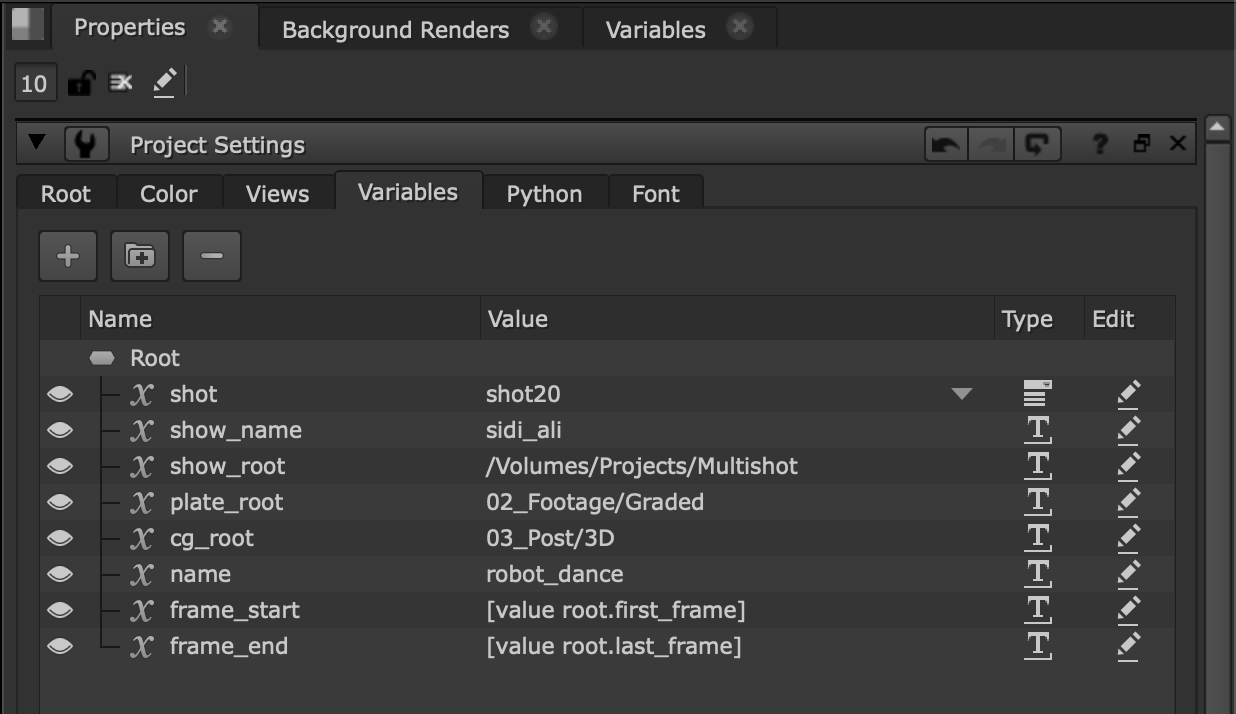
Let’s use __default__ to add GSVs to the project:
gsv_knob.setGsvValue("__default__.show_name", "sidi_ali")
gsv_knob.setGsvValue("__default__.show_root", "/Volumes/Projects/Multishot")
gsv_knob.setGsvValue("__default__.shot", "shot30")
...
Note
setGsvValue() takes a path as the first
parameter. This is composed as a dot separated path, i.e.
variable_set.variable_name.
Here is an example of the Root projects settings after adding variables:
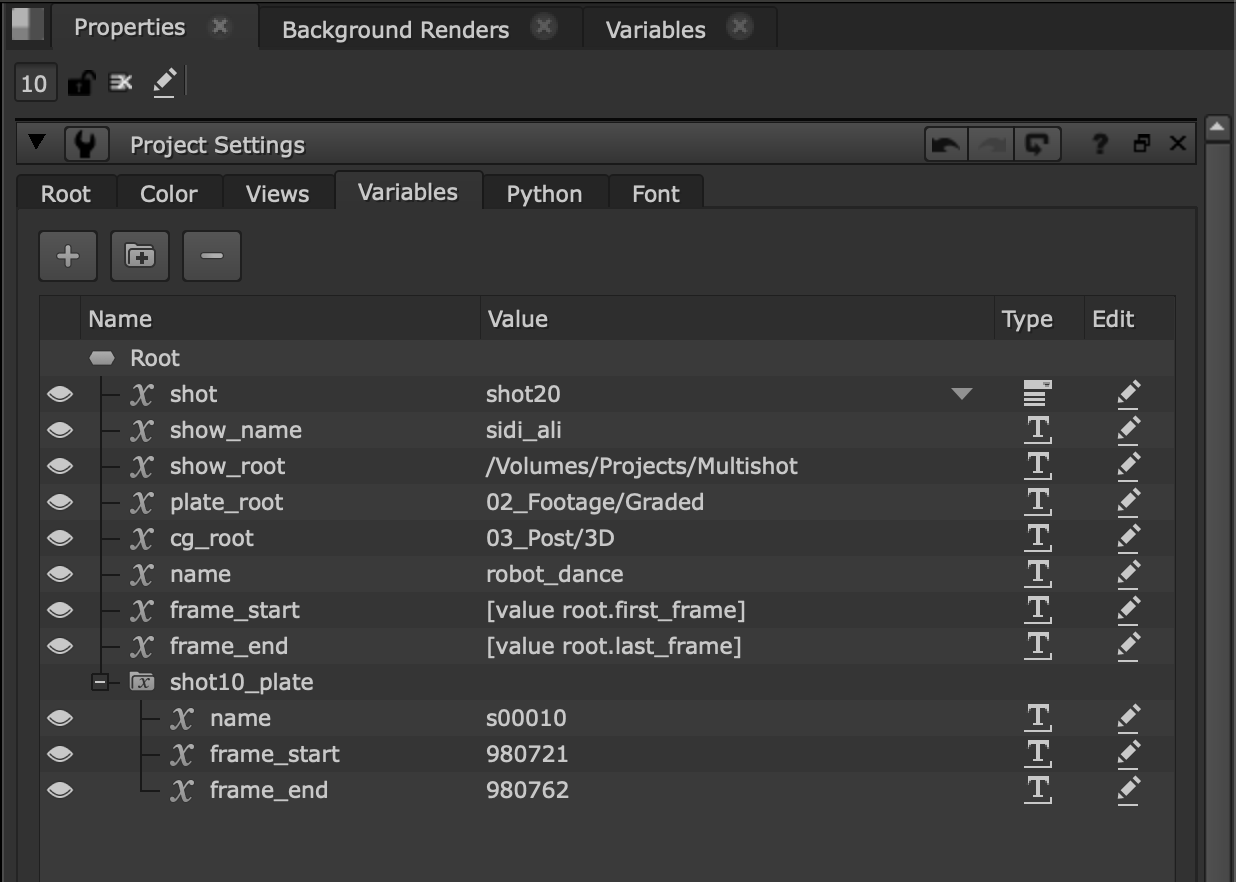
We can also add shot specific variables to a named Variable Set:
gsv_knob.addGsvSet("shot10_plate")
gsv_knob.setGsvValue("shot10_plate.name", "s00010")
...
This is how the Root project settings looks after adding Variables under a Variable Set:
The Gsv_Knob Value Format
The value of the Root Gsv_Knob can be obtained with
value():
gsv_knob.value()
# Result: {
  '__default__': {
    'shot': 'shot30',
    'show_name': 'sidi_ali',
    'show_root': '/Volumes/Projects/Multishot'
  },
  'shot10_plate': {
    'name': 's00010'
  }
}
The format of the value is a dictionary of sets, each containing a dictionary
of 'variable_name': 'value' pairs.
Note
Remember that every GSV is contained in a set. The GSVs directly under the group are placed in the special set called __default__.
Rather than settings GSVs one at a time, they can all be set at once by
rebuilding the knob value using setValue(), for
example:
gsv_knob.setValue(
  {
     '__default__': {
       'shot': 'shot30',
       'show_name': 'sidi_ali2',
       'show_root': '/Volumes/Projects/Multishot2'
     },
     'shot10_plate': {
       'name': 's00010'
     }
   }
)
Removing and Editing Variables and Sets
To make edits to existing GSVs you may want to rename variable sets and GSVs:
gsv_knob.renameGsvSet("shot10_plate", "plates_shot10")
gsv_knob.renameGsv("plates_shot10.name", "shot_name")
You can also remove variables and sets:
gsv_knob.removeGsvSet("plates_shot10")
gsv_knob.removeGsv("__default__.show_name")
To change the value of a GSV, simply set the value again:
gsv_knob.setGsvValue("__default__.shot", "shot20")
Specifying GSV Value Options
Often GSVs only have a few options available. To help simplify the process of setting variables, they can be registered as a List data type. This requires a list of options to be specified. This can be done in python as follows:
gsv_knob.setDataType("__default__.shot", nuke.gsv.DataType.List)
gsv_knob.setListOptions("__default__.shot", ["shot10", "shot20", "shot30"])
Adding GSVs to the Variables Panel
Variables to which you would like quick and easy access can be added to the Variables panel:
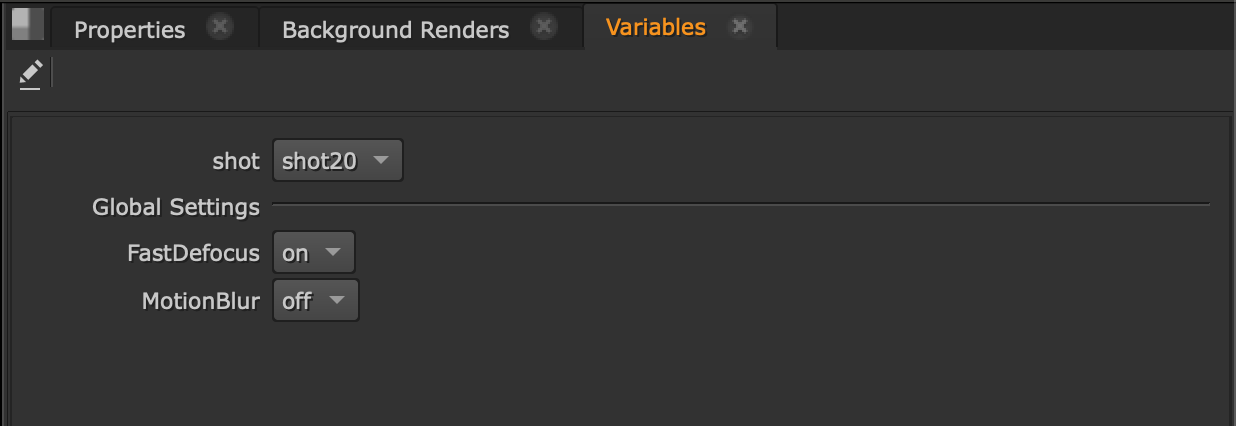
Let us add some global settings to our GSVs:
gsv_knob.addGsvSet("Global_Settings")

gsv_knob.setGsvValue("Global_Settings.FastDefocus", "on")
gsv_knob.setDataType("Global_Settings.FastDefocus", nuke.gsv.DataType.List)
gsv_knob.setListOptions("Global_Settings.FastDefocus", ["on", "off"])

gsv_knob.setGsvValue("Global_Settings.MotionBlur", "off")
gsv_knob.setDataType("Global_Settings.MotionBlur", nuke.gsv.DataType.List)
gsv_knob.setListOptions("Global_Settings.MotionBlur", ["on", "off"])
...
We can then add accessible variables to the Variables Panel:
gsv_knob.setFavorite("__default__.shot", True)
gsv_knob.setFavorite("Global_Settings.FastDefocus", True)
gsv_knob.setFavorite("Global_Settings.MotionBlur", True)
To remove the GSVs from the Variables Panel, simple turn off the favorite property:
gsv_knob.setFavorite("Global_Settings.MotionBlur", False)
Variable Scopes and Overrides
To set up variables which are simultaneously available at different values in different parts of the single Nuke script, you need to define scopes for the variables. Scopes are created by VariableGroups. Each VariableGroup inherits the GSVs of its parent Group but it may override each GSV by providing its own value for the variable.
Note
VariableGroups pass GSV definitions and overrides up the graph. This causes nodes which provide inputs for multiple VariableGroups to be evaluated with multiple values for the same GSV simultaneously. This acts in a similar way to TimeOffset nodes. Multiple TimeOffset nodes may access input nodes at multiple times/frames simultaneously.
Firstly create VariableGroups to introduce new GSVs:
# Outer VariableGroup
sequenceGroup = nuke.nodes.VariableGroup(name="sq_robot_dance")
with sequenceGroup:
  # Inner VariableGroup
  shotGroup = nuke.nodes.VariableGroup(name="s50_robot")
Next add the GSVs:
gsv_knob.setGsvValue("sq_robot_dance.__default__.name", "robot_dance")
gsv_knob.setGsvValue("sq_robot_dance.__default__.scope", "sequence")
gsv_knob.setGsvValue("sq_robot_dance.__default__.frame_start", "1001")
gsv_knob.setGsvValue("sq_robot_dance.__default__.frame_end", "1152")

gsv_knob.setGsvValue("sq_robot_dance.s50_robot.__default__.name", "s00050")
gsv_knob.setGsvValue("sq_robot_dance.s50_robot.__default__.scope", "shot")
Note
setGsvValue() path parameter is extended for
VariableGroups to become variable_group...variable_set.variable_name,
where the elipsis represents a dot separated hierarchy of groups. Each
VariableGroup has a Gsv_Knob which can be used to access
the variable sets defined by the VariableGroup directly. Paths are then
relative to the Gsv_Knob owner.
For example:
sq_gsv_knob = sequenceGroup['gsv']
sq_gsv_knob.getGsvValue("__default__.scope")
# Result: 'sequence'
sq_gsv_knob.getGsvValue("s50_robot.__default__.scope")
# Result: 'shot'
Having added these variables to the parent (sequence) and child (shot) groups, s50_robot inherits name, scope, frame_start and frame_end from sq_robot_dance. However, name and scope have been overridden.
To override frame_start and frame_end it is only necessary to set the variables in s50_robot:
gsv_knob.setGsvValue("sq_robot_dance.s50_robot.__default__.frame_start", "1011")
gsv_knob.setGsvValue("sq_robot_dance.s50_robot.__default__.frame_end", "1951")
Callbacks
Nuke provides callbacks that allow you to execute custom code when GSVs are added, removed, or renamed by the user via the UI or the Python API. These callbacks are useful for validating GSV operations, logging changes, or synchronizing GSVs with external systems.
To register a callback for GSV events, use the appropriate nuke.add…() function. Each callable function that you register accepts specific parameters depending on the event type.
For example, to add a callback that executes after a user adds a new GSV:
def on_gsv_added(path):
    print(f"New GSV added: {path}")

nuke.addAfterUserAddGsv(on_gsv_added)
To add a callback that executes before a GSV is removed, and can prevent the
removal by returning False:
def validate_gsv_removal(path):
    if "Global_Settings" in path:
        nuke.message("Cannot remove Global Settings variables")
        return False
    return True

nuke.addBeforeUserRemoveGsv(validate_gsv_removal)
Note
Callbacks that execute before an operation (addBeforeUser*) can return
False to abort the operation. Callbacks that execute after an operation
(addAfterUser*) cannot prevent the operation.
Available GSV Callbacks
Nuke provides the following GSV callback functions:
For individual GSVs:
addBeforeUserAddGsv()- Called before adding a GSVaddAfterUserAddGsv()- Called after adding a GSVaddBeforeUserSetGsvValue()- Called before setting a GSV valueaddAfterUserSetGsvValue()- Called after setting a GSV valueaddBeforeUserRemoveGsv()- Called before removing a GSVaddAfterUserRemoveGsv()- Called after removing a GSVaddBeforeUserRenameGsv()- Called before renaming a GSVaddAfterUserRenameGsv()- Called after renaming a GSV
For GSV sets:
addBeforeUserAddGsvSet()- Called before adding a GSV setaddAfterUserAddGsvSet()- Called after adding a GSV setaddBeforeUserRemoveGsvSet()- Called before removing a GSV setaddAfterUserRemoveGsvSet()- Called after removing a GSV setaddBeforeUserRenameGsvSet()- Called before renaming a GSV setaddAfterUserRenameGsvSet()- Called after renaming a GSV set
Callback Parameters
Add and remove GSV callbacks receive a path parameter containing the absolute path to
the GSV or GSV set. Rename callbacks receive an additional name parameter
with the new name:
def before_gsv_renamed(path, name):
    print(f"GSV at {path} about to be renamed to {name}")
    return True

def after_gsv_renamed(path, name):
    print(f"GSV at {path} renamed to {name}")

nuke.addBeforeUserRenameGsv(before_gsv_renamed)
nuke.addAfterUserRenameGsv(after_gsv_renamed)
Removing GSV Callbacks
To remove a callback, use the corresponding remove... function with the same
function reference that was used when adding the callback:
nuke.removeAfterUserAddGsv(on_gsv_added)
nuke.removeBeforeUserRemoveGsv(validate_gsv_removal)
Warning
Make sure to pass the exact same function object to both the add... and
remove... functions. Using lambda functions or creating new function
objects will prevent successful removal of the callback.
Example: Logging GSV Changes
Here’s a complete example that logs all GSV operations to a file:
import datetime

log_file = "/path/to/gsv_changes.log"

def log_change(message):
    with open(log_file, 'a') as f:
        timestamp = datetime.datetime.now().isoformat()
        f.write(f"[{timestamp}] {message}\n")

def log_gsv_added(path):
    log_change(f"GSV added: {path}")

def log_gsv_removed(path):
    log_change(f"GSV removed: {path}")

def log_gsv_renamed(path, name):
    log_change(f"GSV renamed: {path} -> {name}")

# Register callbacks
nuke.addAfterUserAddGsv(log_gsv_added)
nuke.addAfterUserRemoveGsv(log_gsv_removed)
nuke.addAfterUserRenameGsv(log_gsv_renamed)
Example: Enforcing GSV Naming Conventions
This example enforces a naming convention for GSVs, ensuring they follow a specific pattern:
import re

def validate_gsv_name(path):
    # Extract the variable name from the path
    variable_name = path.split('.')[-1]

    # Check if name follows snake_case convention
    if not re.match(r'^[a-z][a-z0-9_]*$', variable_name):
        nuke.message(
            f"GSV name '{variable_name}' does not follow naming convention.\n"
            "Use lowercase letters, numbers, and underscores only."
        )
        return False

    return True

nuke.addBeforeUserAddGsv(validate_gsv_name)
nuke.addBeforeUserRenameGsv(lambda path, name: validate_gsv_name(f"{path}.{name}"))