Writing Motion Vectors into a Clip
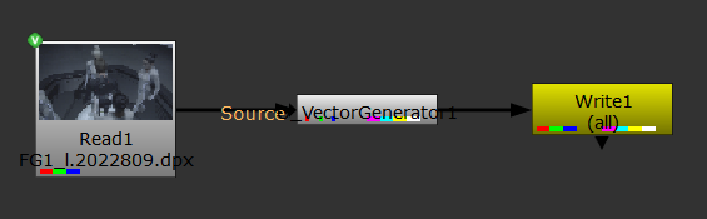
When you're happy with the motion vectors generated, you can save time down the line by writing the vectors into a new clip combining the source and motion channels.
|
1.
|
Select the O_VectorGenerator node in the Node Graph. |
|
2.
|
Select Image > Write (or press W on the keyboard) to insert a Write node after O_VectorGenerator. |
|
3.
|
In the Write node controls, select all from the channels dropdown and set file type to exr. |
|
4.
|
Enter a name for the clip in the file field (for example, my_clip.####.exr), and click Render. |
The newly created motion channels are saved in the channels of your stereo clip. When you need to manipulate the same clip again later, the motion vectors are loaded into Nuke together with the clip.
|
|
|
Rendering the output to combine the clip and the motion channels for future use.
|
 Search Tips