 搜索提示
搜索提示导入Ptex通道或图层
| 1. | 导入.ptx文件到频道,选择: |
• Channels > Import > Import into Current Channel, 要么
• 右键点击频道,然后选择Import > Current Channel。
注意: 如果要导入到新通道而不是当前图层堆栈,请选择Import > Import into New Channel来自Channels 菜单或右键菜单。
| 2. | 导入.ptx图层,选择要导入的图层并导航至: |
• Layers > Import > Import into Current Layer, 要么
• 右键单击图层并选择Import > Import into Current Layer.
注意: 如果要作为新图层导入到图层堆栈中,请选择Import > Import into Current Layer来自Layers 菜单或右键菜单。
注意: 确保不要将纹理导入要保留其当前纹理的图层中,因为导入图层会更新以前的绘画。
的Import 对话框显示。
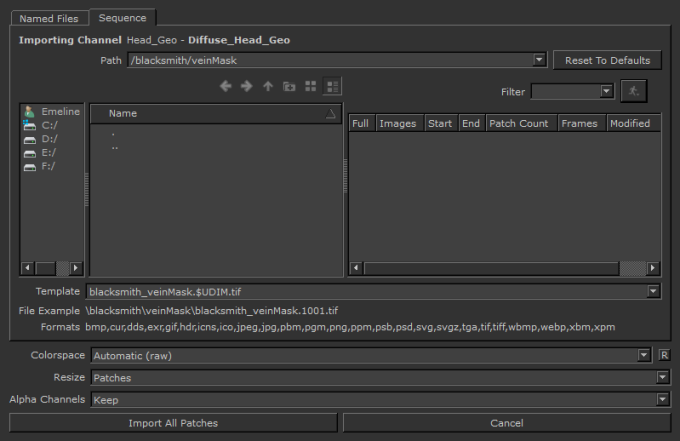
| 3. | 在页面中输入Ptex导入路径Path字段或手动浏览到该位置。 |
注意: 步行 按钮默认情况下处于关闭状态。启用后, Mari会在所选位置的所有文件夹中显示(请参阅Path中的字段Import对话框),并在右窗格中显示所有文件夹和文件。
| 4. | 您可以手动选择要导入的Ptex文件,也可以设置Ptex File Template自动搜索与对象,通道或几何变量匹配的Ptex文件。您可以手动编辑此行。在编辑时, Example Path用示例更新.ptx文档名称。您可以使用以下变量的任意组合: |
• $ENTITY -进口一个.ptx file, where the object name is part of the filename.
• $CHANNEL -进口一个.ptx file, where the channel name is part of the filename.
• $GEO -进口.ptx files, where the individual geometry names are part of the filename.
• $LAYER -进口.ptx files, where the layer name is part of the filename.
• $COLORSPACE -- imports a single .ptx file, where 所使用的色彩空间是文件名的一部分。
| 5. | 在里面Ptex Metadata您可以在字段中设置是否Mari应该: |
• Ignore几何元数据,或
• Import as New Version.
| 6. | 为了Colorspace字段,这是将输入值转换为的色彩空间。Automatic由文件名,大小和文件中的数据类型确定。 |
| 7. | 请点击Import。 |
Mari导入图像。
注意: 如果您尝试将具有退化面的几何体导入Ptex项目, Mari在导入时删除这些面。显示警告对话框,通知您此情况。
注意: 有关导入或导出通道或图层的更多信息,请参见频道和层数。
要将纹理从多个导入到通道.ptx文件,其中一个对象中有多个几何形状,请按照以下步骤操作。
| 1. | 选择: |
• Channels > Import > Import into Current Channel,
• Channels > Import > Import into New Channel,要么
• 右键点击Layers调色板并选择Import > Import into Current Layer。
的Import 对话框显示。
| 2. | 输入.ptx文件导入路径Path字段或手动浏览到该位置。 |
相同$ENTITY, $CHANNEL和$GEO如上所述显示变量,并显示一个Example Path下拉菜单下方.
| 3. | 请点击All。 |
的Ptex Texture Import: Face Texture Resize Options对话框显示。
如果传入的导入的面尺寸匹配,则会显示信息,但无需采取进一步的措施。
如果传入的导入的面尺寸不匹配,则resize method列出了下拉菜单。可用的选项有:
• Resize incoming faces to existing dimensions -更改导入的纹理大小以匹配现有纹理的大小。
• Resize existing faces to incoming dimensions - the existing textures are changed to match those of the incoming import.
• Largest dimensions available per face - whichever texture is the largest, whether existing or incoming import, this is the texture size used. This is the default option when resizing is necessary.

| 4. | 请点击Ok。 |
Mari导入纹理并将其加载到所选通道中。
注意: 调整大小选项适用于几何的每个面。的Ptex Texture Import: Face Texture Resize Options 从中导入新的几何体版本时,也会显示对话框.ptx文件。