 Search Tips
Managing API Keys in Flix Client
Admin users can access and manage API keys in Flix Client by going to File > Management Console > API Keys.
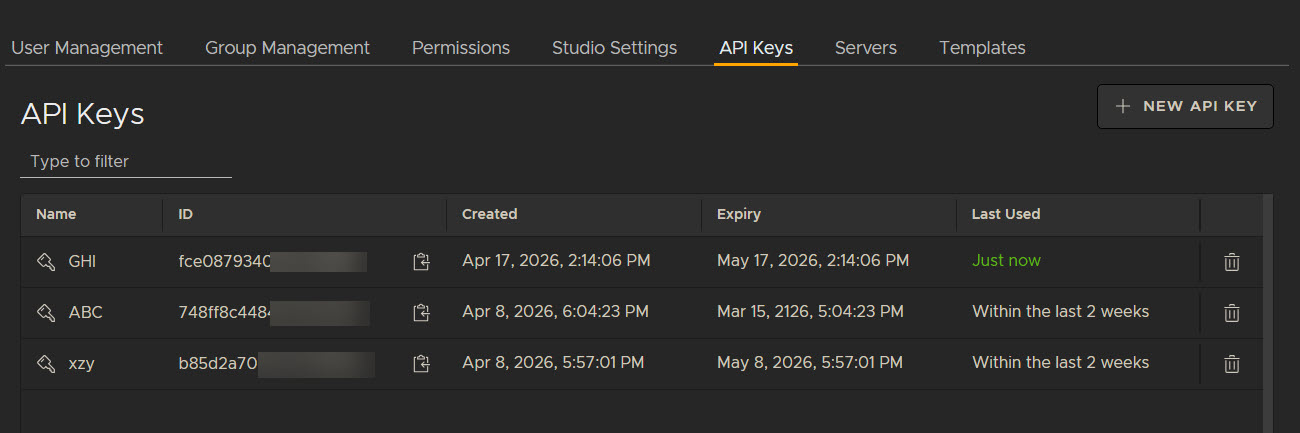
The API Keys table displays all API keys that have been created. For each key, the following information is displayed:
• Name - the API Key name.
• ID - the API Key ID. You can copy this using the copy icon ( ).
).
• Created - displays the date the API key was created.
• Expiry - displays the expiration date of the key.
• Last used - displays when the key was last used.
• Delete - use the delete icon to delete the API key.
Create a new API key
To create a new key, click the New API Key button. A window will appear with two inputs:
• Name - enter the API key name here
• Expiration Date - define an expiration date between 30 days, 60 days, 90 days and Extended Lifetime - this option is for indefinite use and so is active for 100 years.
Click Create and a confirmation message will appear. The window will display the generated ID and a Secret Key. You can choose whether to keep the secret key hidden or visible with the visibility icon ( ).
).
Note: Ensure to copy and save the generated secret key, as it will only be accessible in this window and cannot be accessed once the window is closed.
Click Close to close the New API Key window. The key will now appear in the API Keys table.
Note: For more information on the Flix Server and Client APIs, go to Flix Server and Client API Reference.
