Search Tips
Customizing UsdSuperLayer
You can customize UsdSuperLayer, such as by editing the right click menu, and promoting properties.
• The right click menu is fully customisable with custom Context Menu Plug-ins written in Python. More documentation on writing custom Context Menu Plug-ins can be found in the documentation under USD PROCESSING ENGINE > UsdSuperLayer > UsdSuperLayer > Plug-ins > Context Menu Plug-ins.
• Additionally, Parameters are completely customisable via “Parameter Handler Plug-ins”. More documentation on how to write your own “Parameter Handler Plug-ins” can be found in the developer guide under USD PROCESSING ENGINE > UsdSuperLayer > UsdSuperLayer > Plug-ins > Parameter Handler Plug-ins. These plug-ins are in charge of creating their own parameters and handling which data to read from the layer/stage to display the parameter values and states to the end user.
In this version of Katana we will be shipping with the following plug-ins:
• Properties Parameters Handler
Displayed as “properties”, this reads all of the API and Typed schemas on the prim and displays all of the properties related to these including locally authored or upstream authored property values utilising the Stage Parameter Policy.
This tab will also display any locally authored attributes even if they are not part of the current schemas.
• Metadata Parameters Handler
Displayed as “metadata”, similarly to the Properties Parameter Handler, this tab will provide the parameters for editing upstream or local metadata values at the prim level.
• Shader Parameters Handler
Displayed as “shader”, this tab will only appear if we detect a `shader:id` property. If that is found, we will search the SdrRegistry for the aforementioned shader, and if found present all the properties related to that shader.
Customization Example
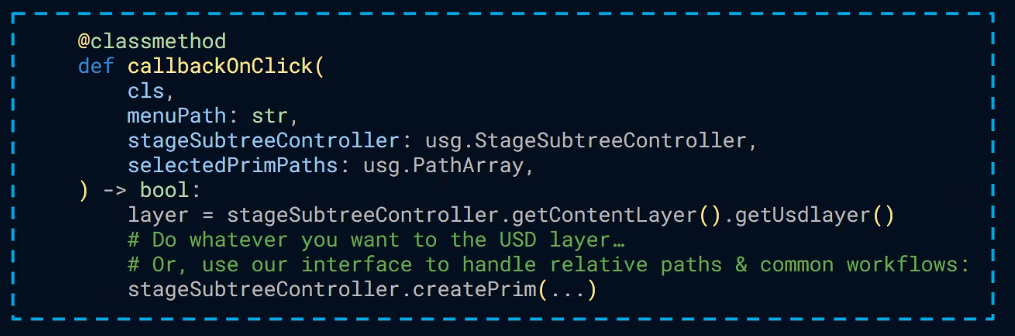
For example, using Python you can create some code like this to customize the right click menu:
See more about how to work with UsdSuperLayer in the Katana Developer Guide.