Search Tips
Selecting Nodes
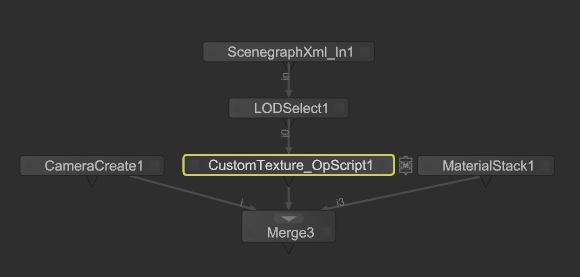
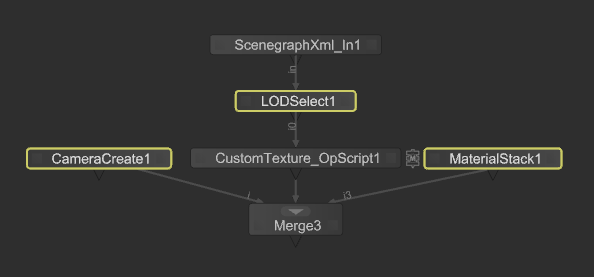
Katana offers a number of options for selecting nodes. Selected nodes are highlighted in yellow.
To select a single node, click once on the node. To select multiple nodes, press Shift while clicking on each node you want to select, or drag on the Node Graph to draw a marquee. Katana selects all nodes inscribed by the marquee.
|
|
|
|
Single node selected. |
Multiple nodes selected. |
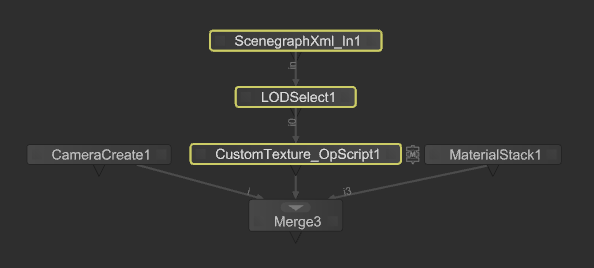
To select all nodes upstream of the currently selected node(s), click on a node and press Ctrl+Up Arrow. Katana selects all nodes that feed data to the selected node.
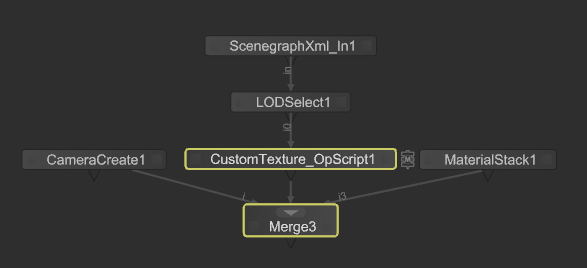
To select all nodes downstream, of the currently selected node(s), click on a node and press Ctrl+Down Arrow. Katana selects all nodes downstream from the selected node.
|
|
|
|
Upstream nodes selected. |
Downstream nodes selected. |
To add to a selection, Shift+click to select more nodes without clearing the current selection.
To deselect a node, Shift+click.
Tip: In the Network Material context, you can select all upstream nodes from a selected node by using Ctrl + Left Arrow. Or to select all downstream nodes from that node, you can use Ctrl + Right Arrow. Learn more about the Network Material context at Building Materials Using NetworkMaterialCreate.