Moving RLM Files
If you want to move a floating license key to another directory you need to shut the license server down first, if it is running. You then need to edit the startup scripts to look in the new location and restart the license server.
On Windows
|
2.
|
Click Start, type regedit, and then press Return on your keyboard. |
|
3.
|
Open the hierarchical structure HKEY_LOCAL_MACHINE > SYSTEM > CurrentControlSet > Services > Foundry License Server: |
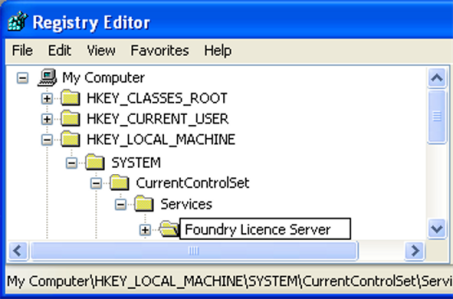
|
4.
|
Move down the Registry as shown and select ImagePath. |
|
5.
|
Assuming your licenses are in C:\tmp, insert this into the path as shown: |
"C:\Program Files\The Foundry\LicensingTools(Undefined variable: Custom.Version (short))\bin\rlm.foundry.exe" "-c" "C:\ProgramData\The Foundry\RLM;C\tmp" "-ws" "4102" "-dlog"
"C:\ProgramData\The Foundry\RLM\log\foundry.log" -service
Note: Semi colons are used to separate license directories on Windows.
On Mac OS X
|
2.
|
Open /Library/LaunchDaemons/uk.co.thefoundry.rlm.plist using a plain text editor. |
<string>-c</string>
<string>/Library/Application Support/TheFoundry/RLM/</string>
With this, assuming your license is in /home/licenses:
string>-c</string>
<string>/Library/Application Support/TheFoundry/RLM/:/home/licenses</string>
On Linux
|
2.
|
Open /etc/init.d/foundryrlmserver using a plain text editor. |
FnLicDir=/usr/local/foundry/RLM
With this, assuming your license is in /home/licenses:
FnLicDir=/usr/local/foundry/RLM:/home/licenses
 Search Tips