Search Tips
Connection Setup
Before we can send a projection to Mari, we need to establish a connection between the two applications.
Nuke
When Mari is launched from inside
| 1. | Click Edit > Project Settings > Mari. |
The Project Settings tab for Mari displays.
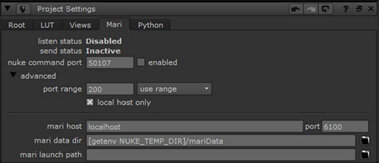
| 2. | Check enabled and set the command port. When enabled,
|
Note: Only one
| 3. | If both |
Note: Checking local host only tells the application to only listen for connections from the local machine. This can prevent accidental connections from different machines and is therefore more secure, but this must be turned off when you want to use the
| 4. | Enter the port number that Mari is set to receive commands on in the port field. This number should match the Mari Command Port number set in the Scripts section of the Mari Preferences dialog. This value should only be changed if the default is already in use by another application. This is automatically set when a command is sent from Mari to |
| 5. | Set the mari data dir. This field specifies the location of the directory used for the data rendered and exported from |
Note: The settings for connecting
Mari
In Mari, there are a number of settings that we need to check before we can receive commands from
| 1. | Open the Mari Preferences dialog by navigating to Edit > Preferences. |
| 2. | Select the Scripts tab and ensure that the Mari Command Port is Enabled. The default Port number should only be changed if it is already in use by another application. This number should match the port number set in |
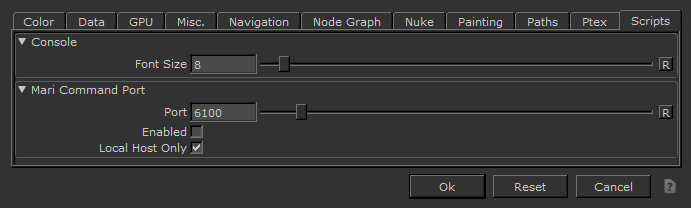
| 3. | As with the |
| 4. | In the Mari Preferences dialog, click on the Nuke tab. |
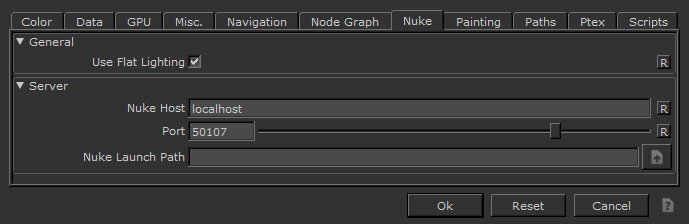
| 5. | Enter the machine name or IP address of the computer running Nuke in the Nuke Host field. If both Mari and |
| 6. | Enter the port number that Nuke is set to receive commands on in the Port field. This number should match the |
You are now ready to exchange data between
Note: If you intend to launch Mari from Nuke from the Mari > Launch Mari menu, you can set the environment variable MARI_INSTALL_PATH so that you don’t need to point to the Mari executable every time. For example, MARI_INSTALL_PATH=/usr/local/Mari<version>/mari.