Search Tips
Taking and Managing Channel Snapshots
You can take snapshots of the current channel or all channels in a project.
Current Channel Snapshots
| 1. | To take a snapshot of the current channel: |
• select Channels > Snapshots > Snapshot Current Channel, or
• from the Snapshots palette, with Channels set to Current, click  , or
, or
• right-click the channel and select Snapshots > Snapshot Current Channel from the dropdown menu.
The Snapshot Channel dialog box displays.
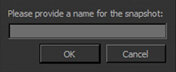
| 2. | Enter a name for the snapshot and click OK. |
All Channel Snapshots
| 1. | To take a snapshot of all channels in the project, either: |
• select Channels > Snapshots > Snapshot All Channels, or
• from the Snapshots palette, with Channels set to All, click , or
• right-click the channel and select Snapshots > Snapshot All Channels from the dropdown menu.
The Snapshot All Channels dialog box displays.
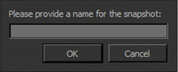
| 2. | Enter a name for the snapshot and click OK. |
Note: Before a snapshot is taken you need to bake or clear the paint buffer. If you have not done this already, a dialog displays asking you to do so.