Search Tips
Painting Preservation with Multiple Ptex Geometries
Geometry versions from .obj files can be added to a Ptex project, provided all the versions are topologically equivalent, that is, they have the same number of faces with the same shape, so that the model does not change. This preserves the paint that has already been applied to the existing version.
Though .obj files can be added to Ptex projects with topologically equivalent versions - that is to say, versions that have the same number of faces, with the same shapes - there are caveats to the functionality:
• If the .obj file contains multiple geometry groups within it and the project has been created to treat these as separate geometries within a file, the .obj file can still be used as a version with fewer groups. These are matched and the paint preserved.
• If more than one geometry is topologically equivalent, then a match for their .obj file group names are used to attempt to distinguish between them.
• If an .obj file with a previously unknown group is used as a version, a new Ptex texture space is allocated to these new geometries.
• If there are fewer geometry groups in the new version than in the existing geometry, the extra geometries are hidden.
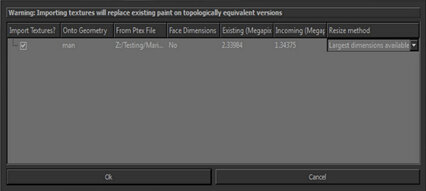
Any topological changes to geometries added as a version, such as a change to the model shape or size, do not transfer existing paint. If a .ptx file is imported as an object version over .obj geometry, any paint that has been applied is overwritten by the incoming version. A warning message on the Ptex Texture Import: Face Texture Resize Options dialog alerts you to the risk of losing existing paint on topologically equivalent versions, as shown in the example below.