Search Tips
Hardware Setup
Once you have done the Network Setup steps, you can create your Hardware config. The primary way to do this is through Outputs > Output Map, although it can also be done manually through Project Graph > Hardware.
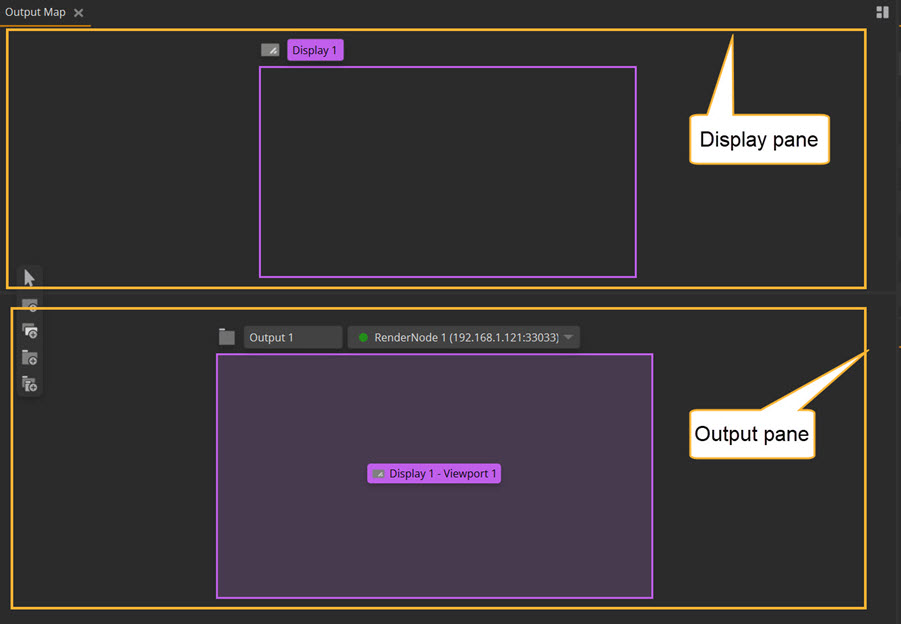
The Outputs workspace enables you to create outputs and displays, and control your output mapping. You can access the Outputs workspace via the workspace tab.
The panel is split into two sections: the Display pane and the Output pane. The following pages outline the setup for each of these panes:
| 1. | Creating Outputs |
| 2. | Creating Displays and Viewports |
Additional Hardware Settings
The above pages will define the main settings needed for a hardware setup. However, there are additional options accessed from the hardware section within the Project Graph such as the OCIO Color Management settings and Timecode Source that you may also need to configure.