 Search Tips
Search is based on keyword.
Ex: "Procedures"
Do not search with natural language
Ex: "How do I write a new procedure?"
Contact Support
Release Notes for Nuke and Hiero 10.5v1
Release Date
07 December 2016
Qualified Operating Systems
• Mac OS X 10.9 (Mavericks) or 10.10 (Yosemite)
• Windows 7 or Windows 8 (64-bit only)
• CentOS/RHEL 5 or CentOS/RHEL 6 (64-bit only)
Requirements for Nuke's GPU Acceleration
If you want to enable Nuke to calculate certain nodes using the GPU, there are some additional requirements. You need to have:
• an NVIDIA GPU with compute capability 2.0 (Fermi) or above. A list of the compute capabilities of NVIDIA GPUs is available at www.nvidia.co.uk/object/cuda_gpus_uk.html.
Note: The compute capability is a property of the GPU hardware and can't be altered by a software update.
With graphics drivers capable of running CUDA 4.2 or above.
Note: In order to use R3D GPU debayering in the Compositing environment, CUDA 6.0 (or higher) is required.
• On Windows and Linux, CUDA graphics drivers are bundled with the regular drivers for your NVIDIA GPU. Drivers from April 2012 onward support CUDA 4.2.
Go to http://www.nvidia.com/Download/Find.aspx?lang=en-us for more information.
• On Mac, the CUDA driver is separate from the NVIDIA graphics driver and must be installed, if you don't have it already. The minimum requirement for CUDA 4.2 is driver version 4.2.5, which can be downloaded from www.nvidia.com/drivers.
Note: We recommend using the latest graphics drivers, where possible, regardless of operating system.
• an AMD FirePro GPU on late 2013 Mac Pro 6,1 and mid 2015 Mac Pro 11,5, running OS X 10.9.3 'Mavericks', or later.
Late 2013 and Mid 2015 Mac Pros Only
Nuke supports GPU-enabled nodes on the late 2013 Mac Pro 6,1 and mid 2015 Mac Pro 11,5 (running OS X 10.9.3 'Mavericks', or later), including a new Enable multi-GPU support option. When enabled in the preferences, GPU processing is shared between the available GPUs for extra processing speed.
Note: To ensure you get the best performance from OpenCL GPUs on late 2013 Mac Pro 6,1 and mid 2015 Mac Pro 11,5, we recommend updating Mavericks to 10.9.5, or above for full functionality. However:
If you're running an earlier version of Mac OS X than 10.9.5 and processing images greater than 4 mega pixels resolution, VectorGenerator, Kronos, and MotionBlur do not support GPU acceleration.
If you're running an earlier version of Mac OS X than 10.9.4, Kronos and MotionBlur do not support GPU acceleration.
New Features
Blend Tracks
Nuke Studio's track blending feature now allows you to apply several new blend modes, as well as the existing over blend. Additionally, a new masking feature has been implemented to limit the selected blend function to only those areas covered by the image's alpha channel.
See https://youtu.be/DUTdW6CyDwM for more information.
You can still designate blend tracks using the right-click Editorial menu, but track headers now feature buttons to turn blending on and off without using the menu.
• Click the Blend  icon to toggle blending on and off.
• Click and hold the Blend icon to select the blend mode.
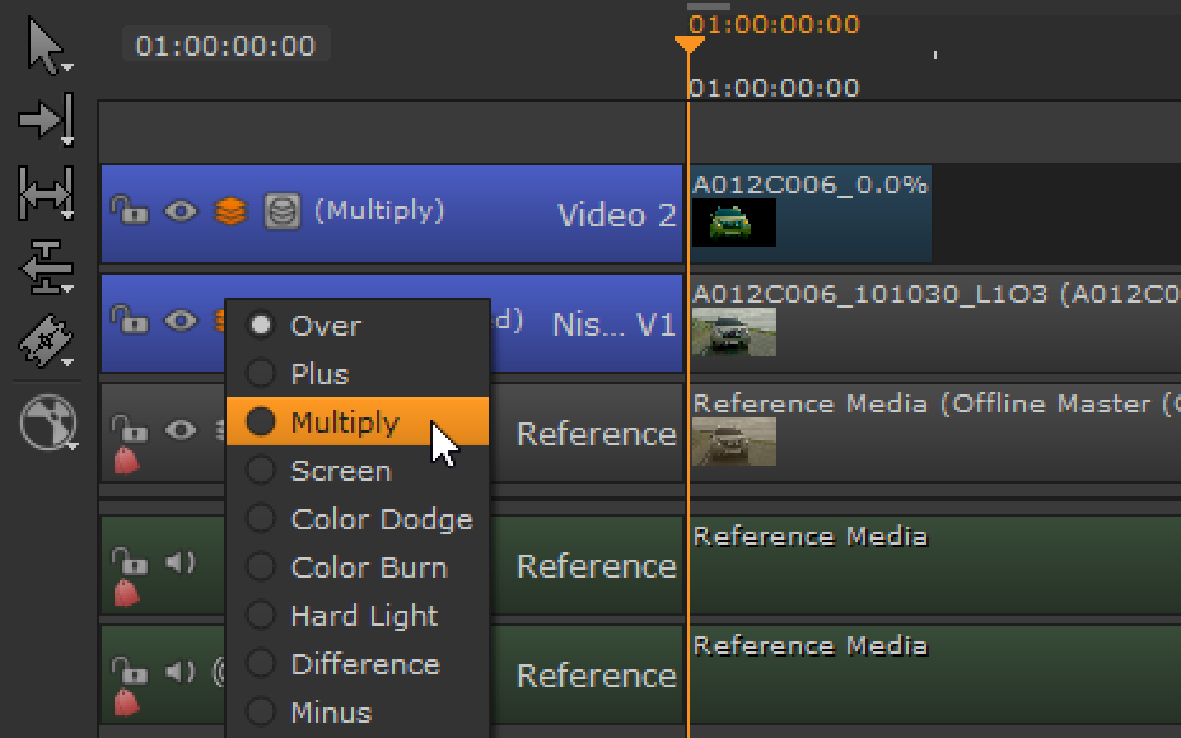
• Click the Mask  icon to toggle alpha masking on and off. The Mask feature limits the effect of the blend to just those areas covered by the alpha channel in the blend image.
Create Comp
Nuke scripts created from the timeline now maintain concatenation, and are laid out more neatly. The total number of nodes is also reduced as we have removed Constant and Copy nodes, and swapped the FrameRange and AppendClip nodes for TimeClip and Merge nodes.
See https://youtu.be/W8uFhsvtaug for more information.
Export
• Nuke Studio's Export dialog has been re-arranged for clarity and ease of use. The core functionality is unchanged, but the new layout improves visibility and uses the available space more efficiently.
See https://youtu.be/AGUDo1sCUCw for more information.
• BUG ID 234898 - Export: Loading a project from an earlier version of Nuke Studio displays a warning, suggesting you save a new version of the project before continuing.
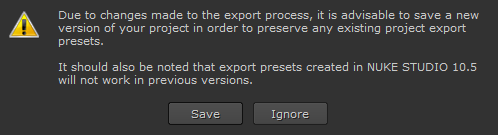
Note: The new version is not compatible with earlier versions of Nuke Studio.
• 153233 - Versioning: Writing a new version of a clip instance now creates a corresponding new folder in the export path, if the folder doesn't already exist.
Format and Resolution Improvements
Working with multiple formats and resolutions is now much easier. Now you can easily change the resolution format of your timeline and maintain any transforms or crop soft effects to match the new timeline resolution.
We have also changed the options for the interpretation of clip instances on the timeline to be more intuitive, using the timeline Properties panel, which defaults to None, maintaining the timeline resolution. These options also carry over to the Export dialog where you can decide at what resolution you want to render your comps.
See https://youtu.be/DgRxgKQvbsQ for more information.
RayRender
• BUG ID 233034 - A new Transmission shader has been added, found under 3D > Shader, which adds support for transparent shadows.
Feature Enhancements
• BUG ID 152134 - Write: Rendering now creates the necessary directories as specified in the Write node's file control, if they don't exist.
• BUG ID 153528 - Nuke, Nuke Studio, and Hiero now support Apple ProRes 4444 XQ encoding.
• BUG ID 177736 - Export: The Export dialog now includes the do not attach prefix option for .exr files.
• BUG ID 177737 - Export: The Export dialog now includes the interleave option for .exr files.
• BUG ID 198597 - Timeline: Nuke Studio now includes reformatting controls for clip instances on the timeline in the Properties tab. You can also set the behavior for new clip instances at Project Settings level and Preferences level. The Project Settings determine how clips are formatted in new sequences, and the Preferences determine how clips are formatted in new projects.
• BUG ID 215257 - Channels: Nuke now sorts the RGBA layer first by default. To process channels using the legacy method, set the NUKE_LEGACY_CHANNEL_SORTING environment variable.
• BUG ID 239202 - Export: You can now define which Write node in your export structure you want to use as your main output for the timeline using the Content menu > Timeline Write Node dropdown. The Write node selected is connected to the Viewer in the resulting script and is also used to render any comp containers in the sequence.
Bug Fixes
• BUG ID 140401 - Roto: Enabling downrez caused B-spline points to jump to the lower-left corner of the Viewer when the Roto node was disconnected.
• BUG ID 144541 - Roto: Drawing/editing a spline in downrez mode, with the Roto node disconnected from the Viewer, produced unexpected results.
• BUG ID 150101 - Gizmos/Groups: Enabling downrez caused handles to jump to the lower-left corner of the Viewer.
• BUG ID 150935 - Export: Shot exports did not apply clip instance reformat size changes by default.
• BUG ID 151049 - Versioning: Selecting Version > Version Up/Down on an empty sequence caused Nuke Studio to crash.
• BUG ID 151907 - RotoPaint: Drawing or editing a spline in downrez mode when the RotoPaint node was not connected directly to a Viewer, produced unexpected results.
• BUG ID 152695 - Monitor Output: 8-bit and 10-bit color conversion was sometimes inaccurate, causing a slight color shift.
• BUG ID 154342 - ModifyMetaData: Adding a ModifyMetaData node to the node tree broke concatenation.
• BUG ID 155479 - Export: The {projectroot} token added // (forward slashes) to the path when chosen from the file browser.
• BUG ID 161910 - Windows only: Rendering .mov files from the timeline was very slow in projects with multiple cuts.
• BUG ID 162519 - mov64: The first frame of files containing the moov atom were not read correctly.
• BUG ID 162892 - QuickTime: Certain files written with both the mov32 and mov64 writers appeared offset by 20 frames when compared.
• BUG ID 162950 - Playback speed occasionally dropped significantly, jumping to an un-cached region of the timeline.
• BUG ID 163120 - Export: Tags were added to exported clips when they were added to the render queue, rather than when the export was completed successfully.
• BUG ID 172943 - Deep: Changing a DeepExpression while the node was attached to a Viewer caused Nuke to crash.
• BUG ID 176330 - Blend Tracks: Tracks in Viewer buffer B were not blended as expected.
• BUG ID 185405 - OCIO: Closing a comp using File > Close Comp discarded any OCIO config settings that were applied in the Project Settings.
• BUG ID 194899 - Export: The DWAA/DWAB compression controls were not displayed correctly.
• BUG ID 196651 - QuickTime: Reading .mov files containing annotation (not those created by Nuke Studio exports) caused Nuke to crash.
• BUG ID 201436 - Export: Nuke Studio added an extra / (forward slash) in export paths specified using the Choose button.
• BUG ID 202140 - Adding a ModifyMetadata node occasionally caused unexpected cropping in the compositing Viewer.
• BUG ID 207336 - Python: Opening a sequence created through Python in the Script Editor caused Nuke Studio to crash.
• BUG ID 215394 - Export: Using the {ext} token to create or save an export structure for two exports of different formats in the same folder with same name did not work as expected.
• BUG ID 216023 - Windows only: Using the root of a drive for the {projectroot} variable was ignored for Create Comp operations.
• BUG ID 217362 - Write: Setting the file type control to mov did not enable the Advanced controls for the default Apple ProRes 4444 codec.
• BUG ID 228379 - Monitor Output: Video mode limited colors in RGB space, rather than in the expected colorspace.
• BUG ID 229556 - RayRender: Rebuilding AOVs from beauty passes did not match the rgba output of RayRender.
• BUG ID 229597 - RayRender: Color information was missing from the direct diffuse AOV.
• BUG ID 229734 - Monitor Output: 12-bit output was incorrect with some cards.
• BUG ID 230994 - Text: Adjusting a transform Pythonically caused Nuke to crash.
• BUG ID 231019 - Timeline: Playback was muted incorrectly if mute was active when playback stopped previously.
• BUG ID 231443 - ModifyMetaData: Groups containing ModifyMetaData nodes caused Nuke to crash on exit.
• BUG ID 232553 - Timeline Viewer: Certain rows of pixels were not decoded correctly for some .tiff files.
• BUG ID 233744 - Monitor Output: The selected output resolution changed when playback started.
• BUG ID 233797 - Create Comp: Non-blended track items with a Fade In transition applied, faded from the track below, rather than from black.
• BUG ID 234744 - Blend Tracks: The default track header size was too small to contain the new blend buttons and the track name.
• BUG ID 235451 - Linux only: The mov32 encoding not available on Linux warning appeared too often when creating .mov export presets.
• BUG ID 235545 - Create Comp: Track-level soft effects did not include Backdrop nodes in the comp.
• BUG ID 235583 - Create Comp: Not all nodes associated with a disabled track item were disabled in the resulting comp.
• BUG ID 235693 - TimeClip: Values of 1 for the frame rangelast or original rangelast controls were reset to 100 when a script was reloaded.
• BUG ID 239079 - Create Comp: Scrubbing the playhead on comps containing retimed blend tracks caused Nuke Studio to crash.
• BUG ID 239212 - Export: Some Process as Clips export presets were merged together in the Export dialog.
• BUG ID 239291 - Soft Effects: Loading a legacy project that employed the deprecated Flip, Flop, or Turn options added multiple copies of soft effects, when the project was saved and then loaded in Nuke Studio 10.5.
• BUG ID 239295 - RayRender: Adding motion blur when using the AmbientOcclusion shader produced wireframe artifacts on the geometry.
• BUG ID 239341 - Create Comp: Disabled clip instances or tracks occasionally caused Create Comp to fail.
• BUG ID 239383 - QuickTime: The mov32 encoder did not present the correct timestamp for repeated frames when compared to mov64.
• BUG ID 239493 - Create Comp Special: Using the Motion retime method in the Export dialog produced incorrect results when compared to earlier versions of Nuke Studio.
• BUG ID 239964 - Export: The Preview file path under the shot template did not resolve folder paths, only file paths.
• BUG ID 241290 - Create Comp: Creating a comp with no Write node selected in the Export dialog failed, displaying an unclear error message.
• BUG ID 241297 - HieroPlayer: Left- or right-clicking on a track header caused HieroPlayer to crash.
• BUG ID 241492 - Create Comp: Metadata nodes in disconnected soft effect track layouts were connected to nodes in the previous track.
• BUG ID 241525 - Export: Enabling Collate Shot Name duplicated soft effects on the collated clip instance.
• BUG ID 241829 - Create Comp: Comps containing retimes were offset by one frame.
• BUG ID 241932 - Timeline: Attempting to delete empty spaces on the timeline caused Nuke Studio to crash.
• BUG ID 242111 - Mac OS X only: Adding dissolves to blended tracks occasionally dropped frames during the transition.
• BUG ID 242281 - Create Comp: Projects containing duplicated tracks or tracks with the same name displayed errors when creating comps.
• BUG ID 242521 - Create Comp: Adding multiple Transform effects to tracks in a comp did not fill the format correctly, resulting in lower tracks being visible in the comp.
• BUG ID 242895 - Localization did not work for clips with multiple versions.
• BUG ID 243335 - Export: Footage was rendered black when rendering with Apple ProRes (HQ, LT, PROXY) and several other codecs.
• BUG ID 243442 - Create Comp: The Burn-in effect occasionally displayed incorrect values for hiero/clip and input/frame.
• BUG ID 245022 - Mac OS X only: When building a track, all exported clips were separated rather than being compiled together, and only one track was created.
Developer Notes
Here are the changes relevant to developers. See Help > Documentation from the Nuke menu bar or www.thefoundry.co.uk/products/nuke/developers/100/ndkdevguide/appendixc/index.html for more information.
As Nuke develops, we sometimes have to make changes to the API and ABI under the hood. We try to keep these changes to a minimum and only for certain releases, but from time to time API and ABI compatibility is not guaranteed. See the following table for the situations when you may have to recompile your plugins and/or make changes to the source code.
|
Release Type |
Example |
Compatibility |
Recompile |
Rewrite |
|---|---|---|---|---|
|
Version |
10.0v1 to 10.0v2 |
API and ABI |
|
|
|
Point |
10.0v1 to 10.5v1 |
API |
|
|
|
Major |
10.0v1 to 11.0v1 |
- |
|
|

Additionally, node Class() names occasionally change between major releases. While these changes do not affect legacy scripts, you may not get the results you were expecting if a node class has been modified. The toolbars.py file, used to create Nuke's node toolbar, contains all the current node class names and is located in <install_directory>/plugins/nukescripts/ for reference.
As an example, between Nuke 9 and Nuke 10, the CameraShake node Class() changed from CameraShake2 to CameraShake3. In the toolbars.py file for the two releases, the entries for the CameraShake node appear as follows:
m.addCommand("CameraShake", "nuke.createNode(\"CameraShake2\")", icon="CameraShake.png")
m.addCommand("CameraShake", "nuke.createNode(\"CameraShake3\")", icon="CameraShake.png")
New Features
There are no new features in this release.
Feature Enhancements
There are no feature enhancements in this release.
Bug Fixes
There are no bug fixes in this release.