 Search Tips
Search is based on keyword.
Ex: "Procedures"
Do not search with natural language
Ex: "How do I write a new procedure?"
Contact Support
Audio Scrubbing
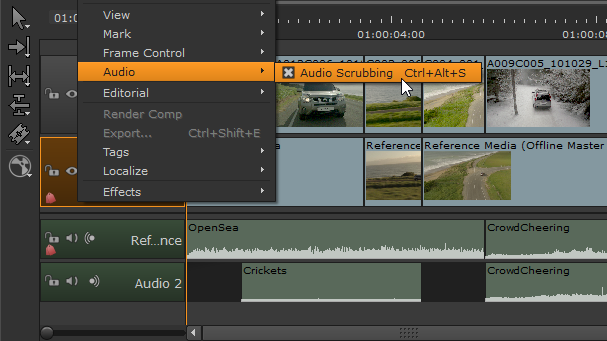
Nuke Studio's timeline supports audio scrubbing, allowing you synchronize audio and video more easily while scrubbing the playhead. Audio scrubbing is enabled by default, but you can disable it by right-clicking in the timeline tab and clicking Audio > Audio Scrubbing or by pressing Ctrl/Cmd+Alt+S.
Audio shots cache temporarily to increase responsiveness during scrubbing. If you need to clear the audio cache, navigate to Cache > Clear Audio Cache.
Note: Audio scrubbing is not currently available through monitor output cards. Audio scrubbing is only supported through internal audio output devices.